#### NOTE
This tutorial is compatible with Gymnasium version 1.4.0.
# Load custom quadruped robot environments
In this tutorial we create a MuJoCo quadruped walking environment using a model file (ending in `.xml`) without having to create a new class.
Steps:
1. Get your **MJCF** (or **URDF**) model file of your robot.
- Create your own model (see the [MuJoCo Guide](https://mujoco.readthedocs.io/en/stable/modeling.html)) or,
- Find a ready-made model (in this tutorial, we will use a model from the [MuJoCo Menagerie](https://github.com/google-deepmind/mujoco_menagerie) collection).
2. Load the model with the `xml_file` argument.
3. Tweak the environment parameters to get the desired behavior.
1. Tweak the environment simulation parameters.
2. Tweak the environment termination parameters.
3. Tweak the environment reward parameters.
4. Tweak the environment observation parameters.
4. Train an agent to move your robot.
The reader is expected to be familiar with the `Gymnasium` API & library, the basics of robotics,
and the included [Gymnasium/MuJoCo](../../environments/mujoco.md) environments with the robot model they use.
Familiarity with the **MJCF** file model format and the `MuJoCo` simulator is not required but is recommended.
## Setup
We will need `gymnasium>=1.0.0` with the MuJoCo extra:
```console
pip install "gymnasium[mujoco]>=1.0.0"
```
```default
import numpy as np
import gymnasium as gym
```
## Step 0.1 - Download a Robot Model
In this tutorial we will load the Unitree Go1 robot from the excellent MuJoCo Menagerie robot model collection.
Go1 is a quadruped robot, controlling it to move is a significant learning problem,
much harder than the `Gymnasium/MuJoCo/Ant` environment.
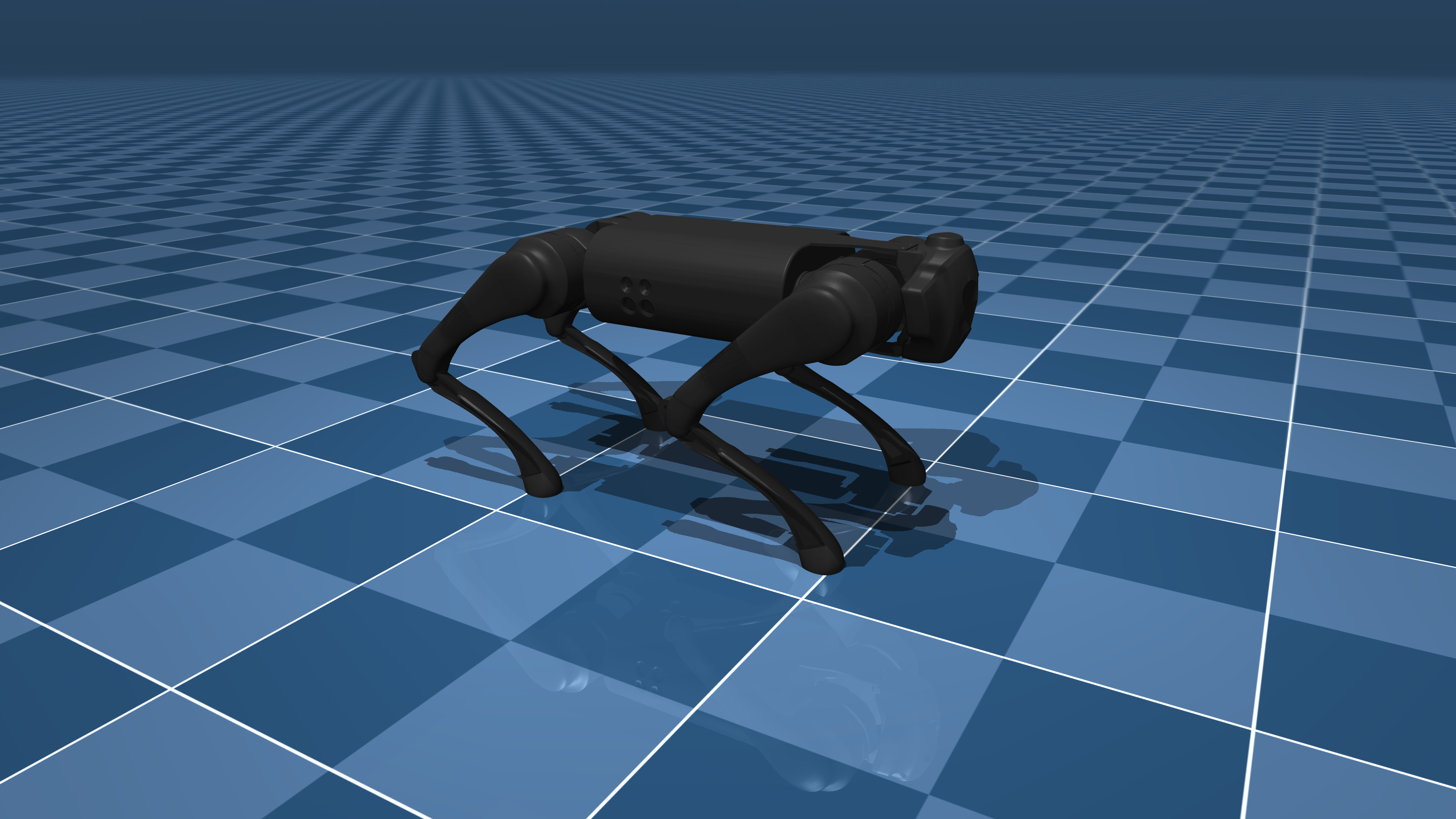
You can download the whole MuJoCo Menagerie collection (which includes `Go1`) into the directory you run this
tutorial from:
```console
git clone https://github.com/google-deepmind/mujoco_menagerie.git
```
You can use any other quadruped robot with this tutorial, just adjust the environment parameter values for your robot.
## Step 1 - Load the model
To load the model, all we have to do is use the `xml_file` argument with the `Ant-v5` framework:
```python
env = gym.make("Ant-v5", xml_file="./mujoco_menagerie/unitree_go1/scene.xml")
```
Although this is enough to load the model, we will need to tweak some environment parameters
to get the desired behavior for our environment, so we will also explicitly set the simulation,
termination, reward and observation arguments, which we will tweak in the next step.
```default
env = gym.make(
"Ant-v5",
xml_file="./mujoco_menagerie/unitree_go1/scene.xml",
forward_reward_weight=0,
ctrl_cost_weight=0,
contact_cost_weight=0,
healthy_reward=0,
main_body=1,
healthy_z_range=(0, np.inf),
include_cfrc_ext_in_observation=True,
exclude_current_positions_from_observation=False,
reset_noise_scale=0,
frame_skip=1,
max_episode_steps=1000,
)
```
## Step 2 - Tweaking the Environment Parameters
Tweaking the environment parameters is essential to get the desired behavior for learning.
In the following subsections, the reader is encouraged to consult the documentation of
the arguments for more detailed information.
## Step 2.1 - Tweaking the Environment Simulation Parameters
The arguments of interest are `frame_skip`, `reset_noise_scale` and `max_episode_steps`.
We want to tweak the `frame_skip` parameter to get `dt` to an acceptable value
(typical values are `dt` ∈ [0.01, 0.1] seconds).
Reminder: `dt = frame_skip × model.opt.timestep`, where `model.opt.timestep` is the integrator
time step selected in the MJCF model file.
The `Go1` model we are using has an integrator timestep of `0.002`, so by selecting
`frame_skip=25` we can set the value of `dt` to `0.05s`.
To avoid overfitting the policy, `reset_noise_scale` should be set to a value appropriate
to the size of the robot. We want the value to be as large as possible without the initial
distribution of states being invalid (`Terminal` regardless of control actions);
for `Go1` we choose a value of `0.1`.
And `max_episode_steps` determines the number of steps per episode before `truncation`.
Here we set it to 1000 to be consistent with the base `Gymnasium/MuJoCo` environments,
but if you need something higher you can set it so.
```default
env = gym.make(
"Ant-v5",
xml_file="./mujoco_menagerie/unitree_go1/scene.xml",
forward_reward_weight=0,
ctrl_cost_weight=0,
contact_cost_weight=0,
healthy_reward=0,
main_body=1,
healthy_z_range=(0, np.inf),
include_cfrc_ext_in_observation=True,
exclude_current_positions_from_observation=False,
reset_noise_scale=0.1, # set to avoid policy overfitting
frame_skip=25, # set dt=0.05
max_episode_steps=1000, # kept at 1000
)
```
## Step 2.2 - Tweaking the Environment Termination Parameters
Termination is important for robot environments to avoid sampling “useless” time steps.
The arguments of interest are `terminate_when_unhealthy` and `healthy_z_range`.
We want to set `healthy_z_range` to terminate the environment when the robot falls over,
or jumps really high. Here we have to choose a value that is logical for the height of the robot;
for `Go1` we choose `(0.195, 0.75)`.
#### NOTE
`healthy_z_range` checks the absolute value of the height of the robot,
so if your scene contains different levels of elevation it should be set to `(-np.inf, np.inf)`.
We could also set `terminate_when_unhealthy=False` to disable termination altogether,
which is not desirable in the case of `Go1`.
```default
env = gym.make(
"Ant-v5",
xml_file="./mujoco_menagerie/unitree_go1/scene.xml",
forward_reward_weight=0,
ctrl_cost_weight=0,
contact_cost_weight=0,
healthy_reward=0,
main_body=1,
healthy_z_range=(
0.195,
0.75,
), # set to avoid sampling steps where the robot has fallen or jumped too high
include_cfrc_ext_in_observation=True,
exclude_current_positions_from_observation=False,
reset_noise_scale=0.1,
frame_skip=25,
max_episode_steps=1000,
)
```
If you need a different termination condition, you can write your own wrapper that overrides
[`gymnasium.Wrapper.step()`](../../api/wrappers.md#gymnasium.Wrapper.step) and changes `terminated` (see [Implementing Custom Wrappers](implementing_custom_wrappers.md)).
## Step 2.3 - Tweaking the Environment Reward Parameters
The arguments of interest are `forward_reward_weight`, `ctrl_cost_weight`, `contact_cost_weight`,
`healthy_reward`, and `main_body`.
For the arguments `forward_reward_weight`, `ctrl_cost_weight`, `contact_cost_weight` and `healthy_reward`
we have to pick values that make sense for our robot. You can use the default `MuJoCo/Ant`
parameters for reference and tweak them if a change is needed for your environment.
In the case of `Go1` we only change the `ctrl_cost_weight` since it has a higher actuator force range.
For the argument `main_body` we have to choose which body part is the main body
(usually called something like “torso” or “trunk” in the model file) for the calculation
of the `forward_reward`; in the case of `Go1` it is the `"trunk"`
(in most cases including this one, it can be left at the default value).
```default
env = gym.make(
"Ant-v5",
xml_file="./mujoco_menagerie/unitree_go1/scene.xml",
forward_reward_weight=1, # kept the same as the 'Ant' environment
ctrl_cost_weight=0.05, # changed because of the stronger motors of `Go1`
contact_cost_weight=5e-4, # kept the same as the 'Ant' environment
healthy_reward=1, # kept the same as the 'Ant' environment
main_body=1, # represents the "trunk" of the `Go1` robot
healthy_z_range=(0.195, 0.75),
include_cfrc_ext_in_observation=True,
exclude_current_positions_from_observation=False,
reset_noise_scale=0.1,
frame_skip=25,
max_episode_steps=1000,
)
```
If you need a different reward function, you can write your own [`gymnasium.RewardWrapper`](../../api/wrappers/reward_wrappers.md#gymnasium.RewardWrapper)
(see [Implementing Custom Wrappers](implementing_custom_wrappers.md)).
## Step 2.4 - Tweaking the Environment Observation Parameters
The arguments of interest are `include_cfrc_ext_in_observation` and
`exclude_current_positions_from_observation`.
Here for `Go1` we have no particular reason to change them.
```default
env = gym.make(
"Ant-v5",
xml_file="./mujoco_menagerie/unitree_go1/scene.xml",
forward_reward_weight=1,
ctrl_cost_weight=0.05,
contact_cost_weight=5e-4,
healthy_reward=1,
main_body=1,
healthy_z_range=(0.195, 0.75),
include_cfrc_ext_in_observation=True, # kept the same as the 'Ant' environment
exclude_current_positions_from_observation=False, # kept the same as the 'Ant' environment
reset_noise_scale=0.1,
frame_skip=25,
max_episode_steps=1000,
)
```
If you need additional observation elements (such as additional sensors),
you can write your own [`gymnasium.ObservationWrapper`](../../api/wrappers/observation_wrappers.md#gymnasium.ObservationWrapper) (see [Implementing Custom Wrappers](implementing_custom_wrappers.md)).
## Step 3 - Train your Agent
Finally, we are done, we can use an RL algorithm to train an agent to walk/run the `Go1` robot.
If you have followed this guide with your own robot model, you may discover
during training that some environment parameters were not as desired;
feel free to go back to step 2 and change anything as needed.
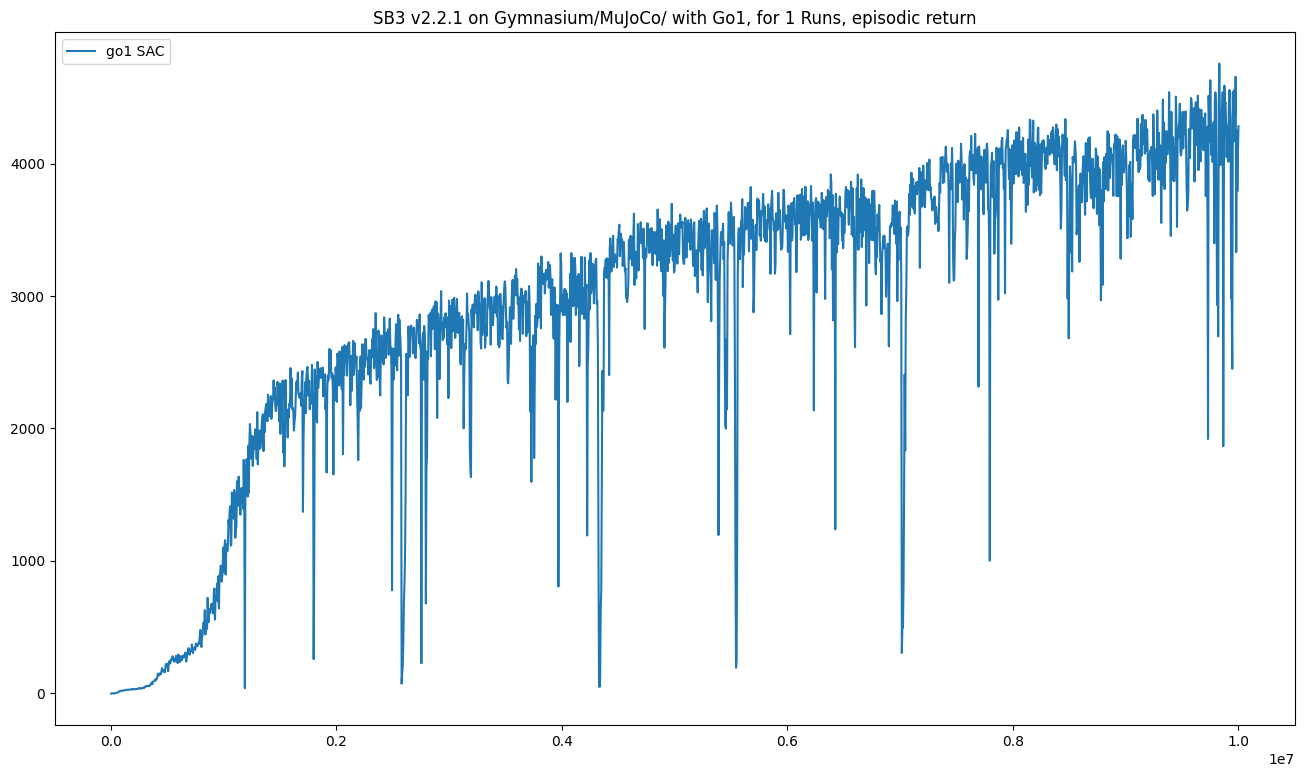
Before training, we check that the environment runs by taking random actions for a few steps.
Replace `env.action_space.sample()` with the actions of your agent.
```default
obs, info = env.reset(seed=42)
for _ in range(100):
action = env.action_space.sample() # Replace with your agent's action
obs, reward, terminated, truncated, info = env.step(action)
if terminated or truncated:
obs, info = env.reset()
env.close()
print("Environment tested successfully!")
```
## Epilogue
You can follow this guide to create most quadruped environments.
To create humanoid/bipedal robots, you can also follow this guide using the `Gymnasium/MuJoCo/Humanoid-v5` framework.
There is a [video of the trained Go1 robot walking](https://odysee.com/$/embed/@Kallinteris-Andreas:7/video0-step-0-to-step-1000:1?r=6fn5jA9uZQUZXGKVpwtqjz1eyJcS3hj3),
reaching speeds of up to 4.7 m/s, the maximum speed according to the manufacturer.
Author: [@kallinteris-andreas](https://github.com/Kallinteris-Andreas)